Friday, February 10, 2012

CM9 update for HP Touchpad is almost ready, according to official video

touchpad-cm9
Just hours after finding out that the CyanogenMod family includes more than one million users, we are happy to inform you that the brilliant minds from CM are very close of releasing what should be their take on Android 4.0 Ice Cream Sandwich on the HP TouchPad.
The 10-inch tablet from HP was discontinued last year due to low sale, and for months we were promised a working Android version on the TouchPad. The CM7 update, released in September 2011, was functional, but had way too many glitches to be considered satisfying by most TouchPad owners today, so a CM9 update was said to come soon, based on Android ICS.
Well, the CM9 is not exactly finished, but the CyanogenMod team has just teased us with a video showing their progress. Aside from the camera and video, everything seems to be working and the update looks promising as heck.
Of course, the software seems laggy here and there, but that’s to be expected, considering that what is shown in the video is only a pre-alpha version. And for a pre-alpha software version, the system boots pretty quick, Angry Birds plays ok, the Wireless and Bluetooth are fully functional, so all in all we have on our hands something to wait and crave for. And by ‘’we’’ I mean you lucky bastards who managed to get your hands on the HP TouchPad when it only went for 100 dollars.
No ‘’release’’ date has been revealed by the CM team for the CM9 update for HP TouchPad, but we know that the brilliant minds from CyanogenMod are ‘’well on their way in terms of progress’’ and hope to give us ‘’something to play with soon’’.
What say you, HP TouchPad owners? Are you as excited as I am for a scoop of Ice Cream Sandwich on your tablet? Or will you pass on the software, fearful for glitches and system instabilities?
Oh, right, I almost forgot. Here’s the video showing the CM9 progress so far:
Via AndroidPolice.com


Android’s lead on iPhone among new smartphone buyers shrinks in Q4 2011

nielsen-smartphone-os-share

Android has enjoyed multiple quarters as the leading smartphone operating system in the United States. And though that lead remains, the gap between Android and its biggest competitor, Apple’s iOS, is more narrow than it has been in quite some time.

Nielsen reports that in Q4 2011, 46.3 percent of smartphone owners surveyed reported that their phone is based on Android. That was high enough to make Android No. 1, but the iPhone enjoyed a strong showing among people who recently purchased a smartphone. From October 2011 to December 2011, the percentage of people who reported getting a new iPhone rose from 25.1 to 44.5 percent. Meanwhile, Android dropped from 61.6 to 46.9 percent.

The iPhone 4S was a massive seller for Apple, and helped put the company on near equal-footing with Android among recent smartphone buyers. That’s important because competition between the two platforms will intensify most among new smartphone buyers. A large number of consumers have already chosen one or the other, but only 46 percent of respondents in Nielsen’s survey report owning a smartphone. That still leaves more than half the country, who are adopting smartphones at an increasing rate, up for grabs.

Why does that matter? Well, for a long time, Android app quality and diversity suffered because of developers, large and small, focusing on iOS because of the higher earning potential. The sheer number of Android users that came later created a situation where developers pretty much have to support Android. Going forward, it’s important that Android is able to keep its duopoly with iOS going so developers and carriers continue to support it as much as they have recently.


Lookout: Android.Counterclank is Aggressive Ad Network, Not Malware

Lookout

As a follow up to yesterday’s warning from Symantec about the threat of Android.Counterclank, Lookout Mobile Security came out with a more nuanced perspective on the Apperhand SDK central to the issue.

Unlike Symantec, they don’t go as far as to consider it malware, since it is not specifically engaging in malicious behaviour or stealing personal information, but they do consider it an aggressive form of ad network that you should think twice about permitting on your device.

They actually said that it is actually less aggressive than a similar one distributed in June 2011 that collected more private data. Apps including the Apperhand SDK do however allow for four annoying consequences that you probably didn’t expect when you downloaded the app:

  1. Identifying your device uniquely from its IMEI
  2. Potentially delivering “Push Notification” ads to the user
  3. Pushing their search icon onto your desktop
  4. Pushing their bookmarks to your browser

Remember, you are shown the permissions an app requires on installation so you can make an educated decision on whether to install. If you agree to this, you’re allowing these types of results. This case should be a good reminder to carefully consider what you’re granting them. If something looks inappropriate, research it further, or don’t download at all.

Lookout said they are continuing to monitor these trends in the app space, and are doing a good job to try and educate users about the risks. As the Android ecosystem continues to grow at its rapid pace, there will be more situations like this that find themselves on the borderline between annoying and malicious, and here at Androinica we’ll do our best to help keep you informed.

Source: The Official Lookout Blog

Gingerbread increases its lead as number 1 Android version, while ICS grows slowly, but steadily

Android ICS

The Android Platform Version chart has just been updated with the December figures and, while there aren’t any important surprises, there are a couple of interesting changes.

Gingerbread remains the number one Android platform and has increased its lead from second place considerably. The 2.3 version powers no less than 58.6 percent of all Android-operated devices right now, while the runner up, 2.2 Froyo, only runs on 27.8 percent of Google powered gadgets.

Those two were in the lead a month ago as well, but the difference between them has increased from just over 25 percent to a whopping 30.8 percent. The second runner-up is Android 2.1 Eclair, with a 7.6% market share, down 0.9 percent from last month.

Honeycomb is in fourth place, as it was 30 days ago, down 0.1 percent to a 3.4% market share. Ice Cream Sandwich, the latest (and greatest, if I may say so) Android version is unsurprisingly only fifth in this share ranking.

Unsurprisingly, because after all there are only a couple of available smartphones running 4.0 ICS and one slate. On the other hand, the next Google developers report (or maybe the one after that) should see an important change in rankings, as more and more smartphones and slates running Ice Cream Sandwich are due to be officially launched this late winter and in early spring.

For the time being, we should mention that Ice Cream Sandwich has gone up from 0.6% a month ago to a whole percent right now, managing to tie the 1.6 Donut and surpass the 1.5 Cupcake. These two have still got teeny-weeny market shares, even though I personally don’t know anyone with a gadget running either of the two Android versions, but soon enough both Donut and Cupcake are set to become extinct.

Check out the full chart below or hit the source link for more details.


Sony’s 2012 launch schedule leaks: 12 Android smartphones coming this year!

Sony-Xperia smartphones

After it finally split up with Ericsson and started announcing and unveiling exclusive Sony branded gadgets, the Japanese multinational electronics giant seems to have big plans for 2012.

Sony is preparing the release of no less than 12 Android-powered smartphones during the course of this year, according to a leak picked up by the guys at gsmarena.com just a couple of hours ago. While this piece of information is far from being official, the list looks pretty legit and makes us think it’s trustworthy.

The first Sony smartphone to be released this year is, as we all expected, the Xperia S, coming in Europe and Asia for around 590 dollars. The monster 4.3-incher, powered by a dual-core 1.5 GHz processor, is set to be followed by three devices in April, codenamed Kumquat, Nypon and Pepper.

These should cost 335, 475 and 395 dollars respectively, being therefore set to hit the medium-end and low-end part of today’s smartphone market. The LT22i Nypon will sport a 4-inch WhiteMagic display, according to rumors, while the MT27i Pepper should come with a 3.7-inch Reality Display.

In June, there should be only one Sony launch, with a mysterious Olive I to hit the market at a 395-dollar price tag, while in July the Hayabusa and Tapioca are themselves set to come to a store near you. The Hayabusa has a $632 price tag next to its name, so it should be something pretty special, while the Tapioca will probably be the most basic Sony handset to hit the market in 2012, with a 188-dollar price tag.

Next up, we have another five smartphones to be released in August and September, but there’s little to nothing known about these, aside from the fact that they currently have exotic codenames like ‘’Lotus’’ and ‘’Mint I’’.

I for one am really excited to see what Sony has in store for us in 2012, especially after checking out the Xperia S, which looks darn nice on paper. On the other hand, I want to warn you to look at this leaked list with caution, because there’s a good chance for some of these smartphones to not be released this year (or ever), while most of them, if not all, will come with different names once they’ll hit the market. Also, keep in mind that the leaked prices are for the Asian and European markets, so in the US all these handsets (or the ones that’ll come, at least)  should be consistently cheaper.


Tuesday, February 7, 2012

Which Version of Android Are You On? [Poll]

We see the periodical updates from Google on which operating system versions are more highly adopted and which are struggling to grow but we’re curious as to how our own reader base is distributed. We want to know which version of Android you are on. Whether it be via custom ROMs or official OTA updates, be sure to select your OS in the boxes below for both phones and tablets.
Personally, I’m on Android 4.0.3 thanks to owning a Galaxy Nexus but we know there are many of you who don’t have recent Nexus devices and are still rocking the latest and greatest. As I don’t have an Android tablet I won’t vote in the poll.
In the comments section, be sure to further discuss which phone you have and how you’ve gotten to whichever version of Android you have if it wasn’t an official OTA update. Poll options do not include triple digit increments for phones and do not include double digit increments for tablets. Let’s hear it!

Rooted Users: You Spoke, Carrier Coverage Listened

(tl;dr – Carrier Coverage getting root support this week)

How would you characterize rooted android users? Geeky, technically savvy early adopters who enjoy tinkering, customizing and innovating? Absolutely, but after the launch of Carrier Coverage yesterday, I might bump a few other adjetives to the top of the list: vocal, influential, and demanding.
And I don’t mean demanding in a bad way. I mean demanding in a “we expect a lot from you” kind of way, like parents criticizing their kid for a B+ math grade because they know their child is capable of A+ grades. The Carrier Coverage team worked LONG and HARD on producing a great version 1.0 product (Android Market Download Link), but without support for rooted users, things went haywire.

The market flooded with 1-star ratings criticizing the lack of root support. Commenters suggested we hate root users and treat them like cheaters. In reality, it’s just VERY hard to accurately identify the correct info when many ROMs awkwardly change fields such as carrier, device, brand, and build name. To insure accuracy, we thought it would be best to disclude rooted user – at least initially – in our reports.
We were wrong.
A couple of the adjetives I left off the list are probably the most important of all: passionate and supportive. Rooted users are the EXACT type of Android users who are MOST likely to want to help and contribute to our vision. We know this and the LAST thing we want to do is alienate this group or make them think we don’t care. That’s why, as of last night, we began working on an update to the app and website that will allow inclusion of rooted data with a yes/no toggle button. Special thanks to all the people who suggested providing this option: it neither compromises data integrity or alienates root users, and might even provide a couple interesting data mining opportunities along the way.
We currently consider rooted user support to be our #1 priority and hope you appreciate that we’re listening to user feedback. We truly want to create a product and service that you love. We’re also hoping that those who left 1-star ratings and negative comments on Android Market will reconsider… we’d be heartbroken to see the long-term potential of Carrier Coverage killed because of a miscalculation in our launch strategy.
That’s right… I admit that we made a mistake. Now we’re correcting it. We hope you’ll continue to leave feedback on the Carrier Coverage Forums. We will continue listening, responding, and acting on your feedback so if you’ve got something to say, please let us know in the appropriate section of the forum. We’ve even created a special forum JUST for Rooted Users. We hope to see you there!
Carrier Coverage Users are ADVANCED
I just wanted to share these graphics which comes directly from the Android Market Developer Console.


Over 30% of Carrier Coverage users are running Android 4.X ICS while other similar apps have less than 1% of users on the most recent version of Android. Over 25% of all users are rocking the Samsung Galaxy Nexus. We’ve obviously got a smart, savvy, on-the-cutting-edge user base and we’ll continue catering to you. We hope you’ll continue offering your support and feedback.
We’ve also fixed a few bugs in an update now on the market as version 1.0.4:
  • [Bug Fix] -> Fixed issue that prevented some GSM phones from not processing signal correctly.
  • [Bug Fix] -> Fixed network detection before submitting signals. Awaiting feedback.
  • [Bug Fix] -> Fixed first load sync issue.
  • [Bug Fix] -> Fixed Honeycomb refresh from not showing.
  • [Feature] -> Added more root user support.
  • [General] -> Removed ICS menu for settings, replaced with single button.
Now head on over to the market, download Carrier Coverage,and hook us up with some encouraging feedback!

Ultra-thin Huawei Ascend P1 S headed to China in March


Huawei surprised us with their incredibly thin Ascend P1 S, which debuted at CES in early January. The phone manages to pack high-end specs including a 1.5GHz dual-core processor and 8MP camera into a case that measures just 6.68mm thick. Despite a rather light 1800mAh battery, it’s the most impressive offering we have seen from the manufacturer best known for its entry-level devices for world markets.
Huawei is extending their reach into new territories including the US, but their main Chinese market will still be the first to get a taste of the Ascend P1 S. The Ice Cream Sandwich handset is now said to be launching in the country in late March. A release in Europe is expected soon after and the phone may eventually come to the US as part of a carrier deal. We’re not ready to put Huawei in the same class as the HTC, Motorola, and Samsungs of the world, but if they keep pushing out hardware like this it may be time to reconsider.
[via AndroidCommunity]

Google Voice receiving update, gets new tablet features and ICS icon

Google is ready to bring Voice into the Ice Cream Sandwich age with an update to the service’s native Android app. Immediately noticeable is a new Android 4.0 style icon, though on the surface the app doesn’t seem to change much from the previous version for smartphones. Tablet users will notice a few differences on the surface including a Click-to-Call button added to the main interface and integration into the People app (users can now initiate a Google Voice call by clicking on a contact entry).


Some users are reporting problems with updating to the latest version of Voice directly on their devices. The easiest way to get the new version is by installing from the web version of the Android Market. The link is below.


Android Market Link: Google Voice

NIteUI by AndroidAtNight – Ice Cream Sandwich Concept Theme (No Root Required)

My good friend @AndroidAtNight on Twitter spent a lot of his free time designing this amazing homescreen based around what he feels like the next iteration of Android, Ice Cream Sandwich, could look like. I have to hand it to him — it looks pretty nice. The NIte UI theme takes a lot of design cues from the new Android Market and even some hints from the new Google Voice widget with its busy but minimal stylings. The theme isn’t your typical root required/flash zip file theme. Instead, its composed entirely from a dizzying amount of apps you can find in your very own Android Market with no root required. I’d be lying if I said the entire process was an easy one. But — if you have the time, the dedication and careful attention to detail, you too could be the talk of the town with a theme that will make the ladies say, “Aye, papi!” (probably not). Hit up the source link and prepare to be learn-ed.
[Via AndroidAtNight]

Potential Fix Found For Motorola Photon 4G “Sleep of Death” Issue [Forum Talk]

Quite a few Motorola Photon owners have been experiencing an issue with their device in what they are calling “The Sleep of Death.” Apparently, the device will shut down at random times without warning forcing users to power back on and check for important missed calls and/or texts. MoPho users took to our very own Android Forums to address the issue though it seems nobody could figure out exactly what was going on and if this was a software issue or a hardware one. This ultimately lead many users back to their Sprint stores for hardware replacements.
As it turns out, AF member 408SandShark seems to have found a possible fix. Apparently, the battery isn’t secure inside the phone and when the device is moved, this causes the battery to lose a connection with the terminals on the device, making the device shut off. The fix? Well, placing some kind of cushioned tape or folded piece of paper in between the battery cover and battery seems to hold everything in place. 408SandShark claims this has remedied “The Sleep of Death” issue for him. Give it a try and let us know if it works for you. Good luck!
[AndroidForums]

Two Android Vulnerabilities Allow Malicious Apps To Install On Your Device Without Your Permission


About a month ago, two Android researchers were able to find two vulnerabilities within the Android OS that have yet to be addressed or patched up by Google in the latest Android updates. What exactly are these vulnerabilities?
Well, the first bug is called a “permission-escalation vulnerability” and apparently, it affects all Android users. The exploit allows for an app to be installed without a user approving of the permissions typically required when installing an app. For instance, say you were to install a seemingly harmless (but infected) app from the Market. A hacker could then use this vulnerability in Android to gain additional malicious permission privileges after an install.
The second exploit is known as a “Linux kernel privilege escalation” and it allows for an unprivileged application to escalate or gain privileges and gain full control over a device.
Last year, Jon Oberheide, one of the researchers who discovered these 2 vulnerabilities, was able to upload an app disguised as an “Angry Birds expansion pack” into the Android Market. Once downloaded, without any user knowledge or input, the expansion pack was able to install three additional apps that monitored a phone’s contacts, location information and text messages. That data could then be transmitted to a remote server. Jon “O” had this to say,
"The Android Market ecosystem continues to be a ripe area for bugs. There are some complex interactions between the device and Google’s Market servers which has only been made more complex and dangerous by the Android Web Market."
Both Oberheide and his fellow researcher Zach Lanier plan to speak more about these Android vulnerabilities at a two-day training course taking place at the SOURCE conference in Barcelona later this year. You can find a video from Oberheide showing off these Android bugs on his Nexus S down below.

[Via TheRegister]

Is Your Sprint Epic 4G Touch Expriencing Problems? Samsung’s Working On It

It’s been almost a week since the release of the Sprint Samsung Galaxy S II Epic 4G Touch (that’s a mouthful!) and we’ve been hearing murmurs of bugs and other general weirdness affecting the device. Some of the bugs include force closes in the calendar and 4G disconnecting when you’re on a call. According to the AndroidPolice, Samsung is well aware of these bugs and is working on a fix.

I’ve also come across a few posts from Epic Touch users in our AndroidForums and on Reddit who have been experiencing WiFi signal loss but this probably has more to do with Samsung’s more accurate bar representation on the Epic 4G Touch than you find on other devices, namely HTC who has been known to inflate their bars. Let’s hope Samsung is hot on this issue as well even if it means inflating bars to make themselves “look good.”
While problems like these aren’t uncommon on devices just after they launch is shouldn’t come as any surprise for early adopters. Still, some bugs can be attributed to good ‘ol fashioned paranoia like this user who was upset because “when making a call.......my screen goes blank and I cannot disconnect, I have to shake the phone to get the screen back.” Guess he didn’t know that it’s actually a normal function of the proximity sensor to keep you from “cheek dialing.”
[AndroidPolice and Reddit]

Don’t Like TouchWiz on the Epic 4G Touch? Use Sprint ID to Quickly Return to a more Stock Experience


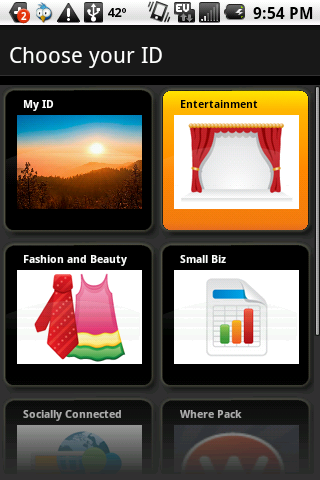
We’ll admit it, we didn’t get the point of Sprint ID when they first announced it. It’s grown on us over time, though, and for more reasons than one. For some of Sprint’s ID enabled phones, like the Epic 4G Touch, it can help you say goodbye to TouchWiz. If for some reason you don’t like TouchWiz 4 on the Epic 4G Touch, simply launch Sprint ID, press “Switch IDs” and press “My ID”.
This will give you a launcher that’s closer to stock with the traditional popup window for adding wallpapers, widgets and shortcuts making a return. We also recommend installing the “Clean” ID pack if you want to take it a step further. This will give you an all black background and only four icons on the homescreen to start. Be sure to discuss other options (such as third-party launchers from the market) below!

Using A Homescreen Replacement App? Spruce It Up With These Icon Packs!


One of the great things about Android is the freedom to customize our homescreens however we want. If you want to take personalization a little further, there are a plethora of custom homescreen replacements that can be found in the Android Market that allow you to change everything from the dock to the icons on your launcher. I’ve always been a sucker for a good icon and thankfully Paul, from Tehkseven, put together a gallery of his 12 best icon packs. I liked ‘em so much, I figured I’d share with you all.


Currently, I’m using Go Launcher EX and changing the icons is as easy as long pressing an icon on my homescreen and clicking “replace.” Of course, the method for changing icons will vary depending on which launcher you’re using but generally it’s a pretty easy task. If you like what you see, hit up the source link for all the downloads links of all the icon packs shown off here and more.
[Via Tehkseven]

Samsung Galaxy S II Lockscreen Got You Down? Here’s AT&T’s Simple Fix


We reported a short time ago on a “security issue” facing AT&T’s Samsung Galaxy S II units. Apparently, when you unlock the phone and it goes to the lockscreen, merely letting the phone fall back asleep or “timeout” will allow you to quickly awake the device and bypass the lockscreen altogether. Well, in an effort to help calm the situation, AT&T has already provided a quick fix. No, this isn’t some long drawn out OTA update that will get pushed to the device once it launches but some simple ingenuity. An AT&T spokesman had this to say,
Samsung and AT&T are aware of the user interface issue on the Galaxy S II with AT&T. Currently, when using a security screen lock on the device, the default setting is for a screen timeout. If a user presses the power button on the device after the timeout period it will always require a password. If a user presses the power button on the phone before the timeout period, the device requests a password - but the password is not actually necessary to unlock it.
Samsung and AT&T are investigating a permanent solution. In the meantime, owners of the Galaxy S II can remedy the situation by re-setting their time-out screen to the "immediately" setting. This is done by going to the Settings->Location and Security->Screen unlock settings->Timeout->Immediately.
Crisis averted. While this is by no means a permanent solution, it should get the job done. You may now go about drooling over the Galaxy S II and counting down the days until it’s October 2nd release date.
Thanks, Steve!

Samsung Galaxy Nexus Ringtones, Notifications and Alarms for All Devices [Download]


A few days ago we showed you how to make your (rooted) phone look like Ice Cream Sandwich and today we are going to show you how to make your phone sound like Ice Cream Sandwich. P3Droid extracted the audio files from the Samsung Galaxy Nexus system dump and uploaded them for the world to download and enjoy. The sounds included in the zipped audio file include alarms, notifications, ringtones and UI. Getting your phone to recognize these files is as simple as following these steps. For best results, use Windows (Macs aren’t very good at merging folders).
  1. Extract the zip file (it should be automatically renamed “audio.” If not, rename the folder “audio.”)
  2. Place the “audio” folder in the “media” folder found on your device’s SD card. If there is no “media” file then create one.
  3. Choose ringtones and notifications from your device’s settings and the new Ice Cream Sandwich sounds should show up under their respective names.
  4. Enjoy!
The “ui” folder found in the audio file is a little more tricky to apply and is only for rooted users. You can apply the all new ui sounds (lock/unlock, audible selections, etc.) by replacing the “ui” folder located in the system folder on the root of your device (system > media > audio > ui).
P3Droid asked that we link to the original thread so we will honor his request. Just keep in mind that you will have to register for that site to download the audio zip. A hassle, I know but I’m sure someone will mirror the file in no time.
With the help of these sounds, ringtones and notifications, you can have your device smelling, sounding and tasting like the real thing. At least until we can officially get our hands on the Galaxy Nexus. Cheers!
[Download from MyDroidWorld]

Stream All Your Media From Your Computer To Your Device With Zumocast [Download]


I have to admit, when I first saw the DROID Bionic commercial, I was a little jelly of their new media streaming app, Zumocast. While Motorola and Verizon would like you to believe that Zumocast will only work for DROID devices, with a little bit of tinkering, the app is actually fully functional for just about all Android devices — regardless of carrier or manufacturer. The cracked version of Zumocast allows for any Android user to stream just about all their media to their device without the need for wires or cables. And where most DLNA applications in the Market require you to be hooked up to your home WiFi network, Zumocast will also stream over a regular 3G or 4G connection. And best of all? It’s FREE.
To get everything up and running all you have to do is:
  1. Download Zumocast application (provided by str8upx on XDA)
  2. Install Zumocast (must enable “Unknown Sources” in your Settings > Applications).
  3. Once installed, create an account
  4. Download and install the desktop version for your computer (Windows or Mac) and set it all up.
  5. Visit Zumocast.com to access all your files from any computer web browser.
Now you’ll always have access to all the files on your home computer no matter where you are or which device you’re using. You can even stream your video and music to your handset. Pretty sweet, huh? A connected life is a good life.
[XDA via GoodandEvo]

Moola! Renamed EasyCheckBook: Your App Did Not Randomly Disappear


You use the same app day-in and day-out until one day, suddenly, the app is no longer there. No software updates were performed, the phone hadn’t even been turned off since the apps last use, but somehow the app is gone. Disappeared. Houdini’d. Did Verizon or Google remotely wipe the app for security purposes? What is going on?
This is exactly what happened to many users of an application called Moola! by Christopher Perry. The sudden disappearance is even more cause for concern knowing that it’s purpose is to manage all your finances in one place. If you think Moola! has disappeared or been deleted from your phone as well, look instead for EasyCheckbook by Christopher Perry: the developer simply renamed the app. Combine automatic updating of apps and you’ve found the source of mystery.
I’m sure this is happening to users of much more than Moola! so next time your favorite app has gone all David Blaine Chris Angel on you… make sure it hasn’t simply been renamed.
[Via Reddit]

Kindle Fire Confirmed To Sideload Apps – Android Market Soon To Follow?


The Android Market not being found on – or anywhere near the Kindle Fire is a turn-off for some prospective buyers. One of the burning questions about the device is whether or not it can sideload apps. This, however inconvenient, could provide for a temporary solution of getting your favorite apps, only be found from the Android Market, onto the device.
Well, with a little knowledge and some good ‘ol fashioned ADB, sideloading apps is actually very possible and here’s how you do it. A tipster gave AndroidGuys the instructions and we now present them to you here. Keep in mind, these instructions are for the Mac but if you’re well versed in ADB you should know what to do on your Windows PC.
  1. On the Kindle Fire Settings screen, go to “Device” and turn On “Allow Installation of Application From Unknown Sources”
  2. Plug your Kindle Fire into your Mac.
  3. Open ~/.android/adb_usb.ini with your favorite text editor
  4. Add the value “0×1949″ to the end of the file and save it.
  5. You’ll need to restart the adb server process to get it to re-read that file. Do that with “adb kill-server”.
  6. Run “adb devices” and you should see the attached device.
Don’t forget to be very careful. We wouldn’t want you installing any apps that are not compatible with your brand new (but not too expensive) Kindle Fire. No word if anyone has been able to sideload the new Android Market onto the tablet but we’re keeping our fingers crossed. Does this change anyone’s mind about picking one up for the holidays?
[ActLocalMedia via AndroidGuys]

Android Market Now Installable On The Kindle Fire [How To]


Kindle Fire is a hot topic these days (no pun intended). Yesterday, I told you guys about Amazon releasing the source code for the Fire then, shortly after, we found out the device had been rooted. Fast forward to today, where we now find out the Android Market is now easily installable on the budget tablet. Things are moving fast around here.
BriefMobile was kind enough to point out the steps necessary and while there’s nothing here that’s too tricky for the average user (I prefer this more user friendly method of using a file manager over ADB), there is still always the risk of breaking something when altering or playing around with system files. Here’s the steps:
Prerequisites
  • Root your Kindle Fire
  • Download the following apks (You are on your own finding them, I’d rather not link them here)
    • GoogleServicesFramework.apk
    • Vending.apk (Latest Version 3.3.11)
  • Root Explorer App (or similar that lets you change ro/rw permissions)
  • Side Loading Apps activated on Kindle Fire
  • On the Kindle Fire Settings screen, go to "Device" and turn On "Allow Installation of Application From Unknown Sources"
Instructions
  1. Transfer the .apk files to your Kindle Fire via PC / Mac (remember where you put them)
  2. Open Root Explorer App, and navigate to the transferred .apk files
  3. Select the GoogleServiceFramework.apk and install
  4. When complete, click "Done" and return to the file location for Vending.apk
  5. Long-press Vending.apk and select the "Move" option on pop-up menu
  6. Navigate to /system/app folder
  7. Change mount option from RO to RW (read-only to read-write)
  8. Paste Vending.apk into the /system/app folder
  9. Long-press Vending.apk and select "Permissions" from pop-up menu
  10. Change permissions to match all other apps in this folder (rw-r-r-)
  11. Reboot your Kindle Fire
  12. Once reboot is complete, select Market App and log-in as usual.
  13. Enjoy!
Seeing how the Kindle Fire isn’t “supposed” to have the Android Market, you may notice a few apps missing (developers will later have to add support for the device). Until then, this is going to have to do — and it ain’t so bad.
[Via BriefMobile]

Galaxy Nexus Public Service Announcement: 3rd Party Batteries Not Compatible, OTA Update Arriving On Day 1


In some “extra” Galaxy Nexus news (you guys ready for Friday!?) I wanted to make sure our readers were well of a few things before they jump the gun and rush to online retailers for accessories, specifically — batteries. As it turns out, NFC and the stock Galaxy Nexus battery go hand-in-hand. You can’t have one, without the other. This is due to the antenna for the NFC chip being integrated into the battery meaning if you go with a 3rd party option, don’t plan on using any of the NFC features like Google Wall- er, Android Beam at least not unless retailers specifically mention something about their product being NFC compatible. Of course, there’s always the option of hitting up Samsung’s site where they will have all the accessories you need for your shiny new Galaxy Nexus — just expect to pay a little premium for their official batteries to keep NFC up and running.
The second bit of information we have for you guys is there will be an OTA update hitting devices as soon as they power on. This is most likely the final Android 4.1.0 OTA we told you guys about last week so be expecting that when you pick yours up. Honestly, I’d be lying if I said I wasn’t jealous.
[Via Reddit | Droid-Life | AndroidCentral]

Pro Tip: Take Photos During Video Recording with the Galaxy Nexus


With Android 4.0′s updated camera software, the Galaxy Nexus has quite a few tricks up its sleeve for blossoming photographers. Time lapse video and sweeping panoramic views are just the tip of the ice berg. Here’s one feature that you will hopefully be as pleasantly surprised to discover as I was.
While using the camera in video mode, tapping the screen will take a snapshot of the scene without interrupting video recording (a red box around the viewfinder means you’re doing it right). Results aren’t as instant as when using the camera in photo mode and you lack the ability to refine the shot’s focus and adjust other parameters, but the functionality insures the best of both worlds, allowing you to capture life’s precious moments without missing a beat. Opinions may vary on the image quality of the Galaxy Nexus’ 5MP camera, but you can’t argue with the rich set of capabilities Google has built into the Ice Cream Sandwich software.
[via Reddit]

Kindle Fire Receives Early Build Of Android 4.0 Ice Cream Sandwich [Video]


You had to see this coming and many of you have actually been waiting for this moment. Android’s first successful “budget” tablet — the Kindle Fire — has finally gotten its taste of Ice Cream Sandwich thanks to the tireless Android modding community who dropped a pre-alpha AOSP ROM for the device early today.

Just how pre-alpha is this build you ask? Liliputing provided a video of Kindle Fire running ICS and I’d have to say, it doesn’t look too shabby. While still very much a work-in-progress, the processor seems to handle the ROM quite smoothly with most of the kinks coming form the software side of things where audio and video functionality are currently broken. Developers did manage to find a fix for the SD card storage problem they were having where the device wouldn’t recognize internal storage. Progress seems to be moving along nicely.
Special thanks to JackpotClavin for getting the pre-alpha ROM up and running. For the adventurous or extremely curious, you can hit up the XDA source link for all the downloads and Liliputing put together a handy quick guide for getting it up and running on your rooted Kindle Fire. If you guys decide to give it a try, check back in here and let us know how it went.
[XDA via Liliputing]

Turn your Windows 7 desktop into an Ice Cream Sandwich dream


No, the above image isn’t some screenshot of Android 4.0 running on a tablet, it’s Windows 7 with the perfect touch of Ice Cream Sandwich. Lifehacker has David Molina’s Androidified setup as their featured desktop, and you can too. It starts with the ICS wallpaper and uses a combination of themes, skins, and other tools to achieve the final look. Don’t forget the Roboto font! The perfect mix of Android 4.0 simplicity and Windows functionality will take a bit of tweaking, but Lifehacker has the rundown of everything you will need. Hit up the source link below to get started.
[via Lifehacker]

New Gmail App Adds “Experimental” Feature – Get It Now For Your Galaxy Nexus [Download]

Looks like Google wrapped up a bonus treat for ASUS Transformer Prime users inside their Ice Cream Sandwich update. Apparently, a new “experiments” function popped up inside of the native Gmail app. Generally speaking when dealing with Android, you want to be wary of anything labeled as “experimental” but in this case, you need not worry.

This new “experiements” function enables a few new optional features inside of Gmail, the first allowing for a more broader search that dives inside of emails, while the another feature enables drag-and-drop functionality of “contact chips” (or small contact tiles) inside the app. Nothing too fancy but none-the-less very helpful if you spend a lot of time inside of Gmail.

While the new Gmail version 4.0.3-239410 came bundled inside the Ice Cream Sandwich for the Transformer Prime, Galaxy Nexus users, were sadly, left with the older version. But don’t fret because the all new Gmail app — complete with Experimental feature — has been extracted and is ready for the downloading (no root required) via the link below. Enjoy.
Download Gmail 4.0.3
If you are rooted, this version is said to work on any Android 4.0 ROM so give it a try. If it doesn’t work, simply uninstall and download the Market version. No harm, no foul. We still have no clue when we can expect this version to officially hit the Android Market but I imagine it wont be very long now.
[Via ComputerWorld | AndroidPolice]

Minus for Android Updated, Get 25-50GB of Storage for Free

Minus for Android has been updated recently to include a couple of cool changes. Firstly, you’ll now be able to open Minus profile links using the app instead of staying within the browser. It’ll give you easy access to friends’ profiles without having to deal with a web UI over a native one.


You also get basic searching features for users and folders so it’ll be even easier to find the files you and your friends have uploaded. The general round of bug fixes and performance enhancements can also be had.
Minus is kind of like DropBox or Box.net, but they are extremely generous with the amount of free storage awarded to users starting at 25GB, something you’d have to pay for with most other companies.
Users who have migrated from DropBox or Box.net have tons of good things to say about it. If you’re looking for an online file host and you don’t want to pay a lot to be able to store a lot, give Minus a try. Find it here in the Android market. [Minus via AndroidForums.com]

EA’s The Sims FreePlay likely coming to Android soon

the-sims

FedEx and UPS are at my house on a weekly basis, but I’m accustom to getting phones, tablets, and accessories sent to me from PR companies, not swag.

That’s what happened to me a short while ago when I received a bundle from EA Mobile. To my surprise, the box featured a pair of paper speakers, a scarf that will get plenty of use when I go to New York soon, and a mug that I can use to drink my morning tea. Um, thanks for the gifts EA, but why on Earth would you send this to me?

All of the swag EA sent is branded with The Sims Free Play, a popular freemium game based in the Sims universe. Players live virtual lives by building and decorating homes, interacting with other avatars, completing goals, and the like. The game is free, but users can access in-game purchases for upgrades. It’s highly-rated on iOS, so maybe EA is finally bringing the party over to Android?

It would appear so because Taylor from AndroidAndMe got the same curious bundle of promo materials. I’d imagine some of our other friends at Android blogging sites will report receiving the package as well, so this must be EA’s way of teasing us that the game is coming soon. How soon? Very soon most likely, but I’ll keep an eye out. For now, I have some mint tea on the stove to tend to while listening to my new paper speakers.


New HTC Studio Division for Hero Device Philosophy Formed

Just a day after HTC admitted that their 2011 portfolio was uninspiring and below the standard that they’d like to meet, it looks like they will be creating a new division to help streamline their processes for 2012.
Namely, HTC has created a Studio division which will report directly to Peter Chou, their CEO. This division will overlook the new Hero Devices philosophy of creating consumer-desired devices.


HTC says they’re willing to go in any direction to help keep their products fresh and clean. Aside from drastically reducing the amount of devices they come out with (there are a ton), they’ll also consider breaking away from their commitments to certain component providers, such as the longstanding relationship they have had with Qualcomm.
That’s not to say that the Taiwanese company will stop using Qualcomm, but it won’t be their only choice for powering devices as it has been in the past.
Qualcomm was notably late to the dual-core game and everyone else is already falling behind NVIDIA in the quad-core department. HTC doesn’t want to be crippled by their partners’ inability to catch up so they’ll broaden their horizon as they see fit for each device produced.
More than the chipset, HTC especially wants to focus on build quality and battery life of their phones, as well as improve the user experience as a whole. As they see Samsung capturing the market like no other has they realize 2012 is a time for drastic change.
We’ll be excited to see what will come of all this, though it isn’t clear when they’ll start designing devices with this new approach in mind. We could see something as early as Mobile World Congress this month but we won’t hold our breath. [via SlashGear]

DROID Bionic Will Soon Get a Maintenance Upgrade [5.9.902]


The Motorola DROID BIONIC has had an update in the works for a bit of time now and it looks like testing is all wrapped up. The changelog states that V-Cast Apps and Amazon MP3 are both preloaded. We’ve also got improvements for data connectivity and stability, WiFi mobile hotspot fixes, improvements in overall device stability and a lot more. The full changelog found in this PDF file should give you a great idea of what to expect. As always, we could be seeing this anytime between now and 2-3 weeks from now, but recent updates have come within 2-3 days after Verizon publishes the changelog. Be on the lookout for it and let us know whenever it gets sent to your handset. [via Droid-Life]

Samsung’s March 22nd Event in France Won’t Unveil Any New Devices


Yesterday, it was discovered that Samsung would be holding a mobile event in France on March 22nd. Speculation ran wild, of course, with some even suggesting that this could be the launch platform for the Samsung Galaxy S III, an unlikely but not impossible notion. Well, it looks like the “unlikely” part rings true as Samsung reportedly debunked rumors of the Galaxy S III, or any new device, being announced at this event. The french show will serve to showcase their existing device portfolio to attendees. Samsung will likely announce new devices before then and those will be in attendance, but don’t get your hopes up for the Galaxy S III. Anything could happen, of course, so we’re going to remain front-row and center for anything Samsung announces this quarter. [via TheNextWeb]

Game Insight releases free My Railway train simulation game for Android

 myrailway
Game Insight is one of the most popular mobile developer studios of late, being ‘’to blame’’ for the successes of such titles as Paradise Island, My Country or Crime Story. Their latest Android offering is called My Railway and looks like a pretty solid (and free) train sim game, which has already gathered over 4,700 favorable reviews on Android Market (in a matter of hours, that is).
While I personally have not actually played the game and, to be honest, I don’t think I will (I’m more of a sports and racing simulation fan), I can understand what all the fuss is about. There are a bunch of features and activities supported in My Railway and the graphics look pretty decent, at least for an arcade mobile game made available for free.
The biggest problem I usually have with these games is that they are basic and kind of repetitive, letting you only complete a certain number of missions. On the other hand, My Railway for Android lets you do a bunch of things, including building railways, hiring friends as engineers, customize your train stations and complete different and unique daily quests.
Another pretty nice thing at My Railway is the interactive part of the game, as you need friends in order to progress through different levels. That allows you to meet new people with which you share the same passion for trains and railways and makes the game more exciting and original.
You can sneak a peek at a couple of screenshots below and, if you are the least bit intrigued about this simple, but fun game, hit the source link at the end of the article to download. Worst case scenario you lose a couple of minutes, but not money, as My Railway for Android is available for free. Enjoy!


AndroidMarket

Twitter Delicious Facebook Digg Stumbleupon Favorites More

 
Design by Free WordPress Themes | Bloggerized by Lasantha - Premium Blogger Themes | Best Hostgator Coupon Code